
FizzleFoil
Your iCloud, safe on your own drive.
Coming soon · Mac, iPhone, iPad and Windows
Your iCloud, safe on your own drive.
Coming soon · Mac, iPhone, iPad and WindowsDelete a photo on your phone and it's gone from your Mac too. Lose access to your Apple account and everything goes with it. FizzleFoil keeps a separate, complete copy of your iCloud on a drive you own, and keeps it up to date by itself.
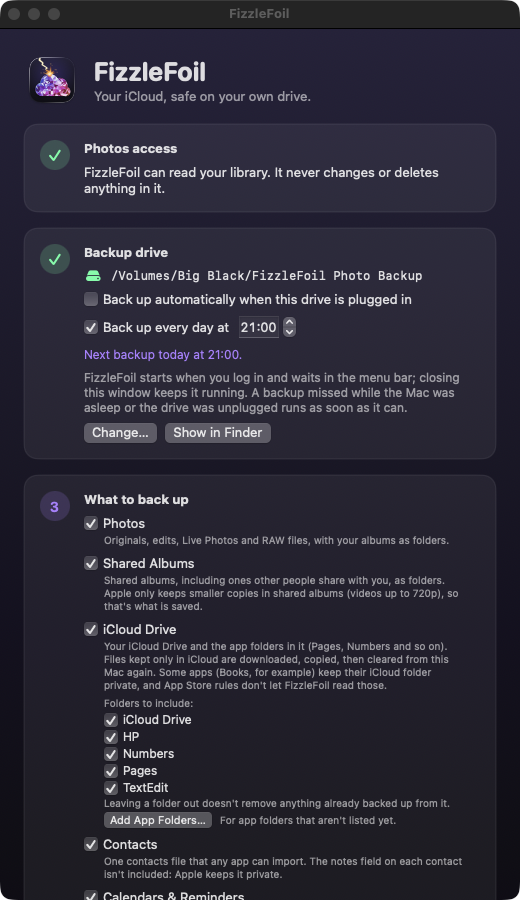
Every photo and video in full size, with your edits, Live Photos and RAW files. Your albums become folders, without taking up extra space.
Albums you share, and ones other people share with you, saved as folders.
Your files and the app folders inside it, such as Pages and Numbers. Pick which folders to include.
Everyone, from every account, in one standard file any contacts app can import.
Standard calendar files that Calendar, Outlook and Google Calendar can all open.
Everything is ordinary files in tidy Year / Month folders. Open them in Finder, on any Mac.
Back up every day at a set time, or the moment your drive is plugged in. A missed backup runs as soon as it can.
Each file is read back from the drive and compared before it counts as safe. "Check my backup" re-checks the lot and repairs anything a failing drive has damaged.
Restore missing photos straight into Photos, with their dates, places, albums and even editable edits. Nothing is ever doubled up.
Mac: macOS 14 or later. iPhone and iPad: iOS 17 or later, with a drive plugged in; the iPhone and iPad app backs up photos, contacts and calendars (iCloud Drive is backed up by the Mac app). Windows: Windows 10 or 11 with Apple's iCloud for Windows app, backing up iCloud Photos and iCloud Drive. All need an external drive. Some apps, Books for example, keep their iCloud folder private, so App Store rules don't let FizzleFoil read them.